← Back to Portfolio PagerGPT

AI Support Automation · SaaS Platform

A no-code AI chatbot platform that actually resolves support.

PagerGPT lets any team train a chatbot on their own knowledge, deploy it across web, Slack and Teams, and hand off to humans when it matters — turning scattered help docs into answers in seconds.
Role
Lead Product Designer
Timeline
2024 · 16 weeks
Platform
Web App (Desktop)
My Focus
UX · UI · Design System
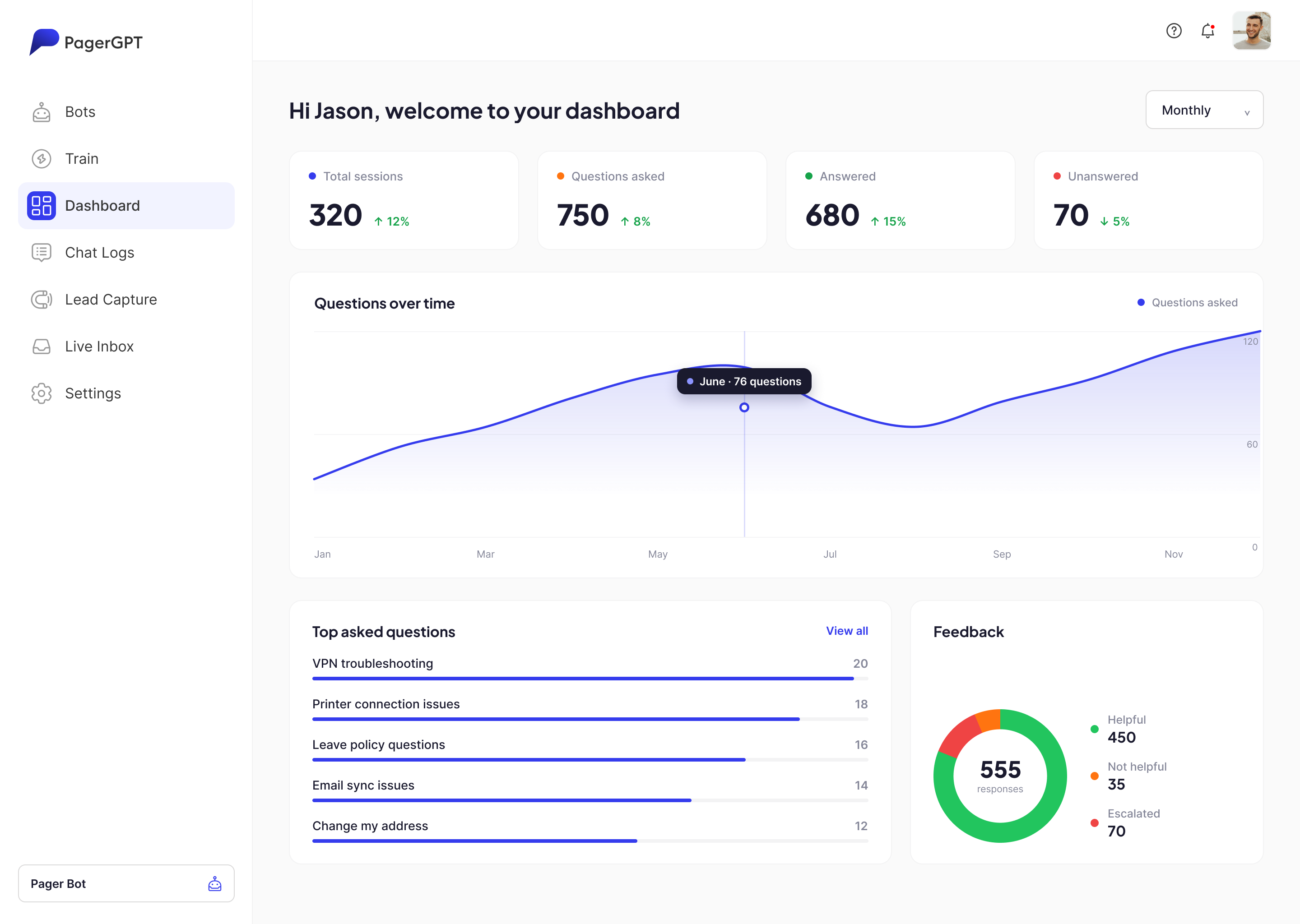
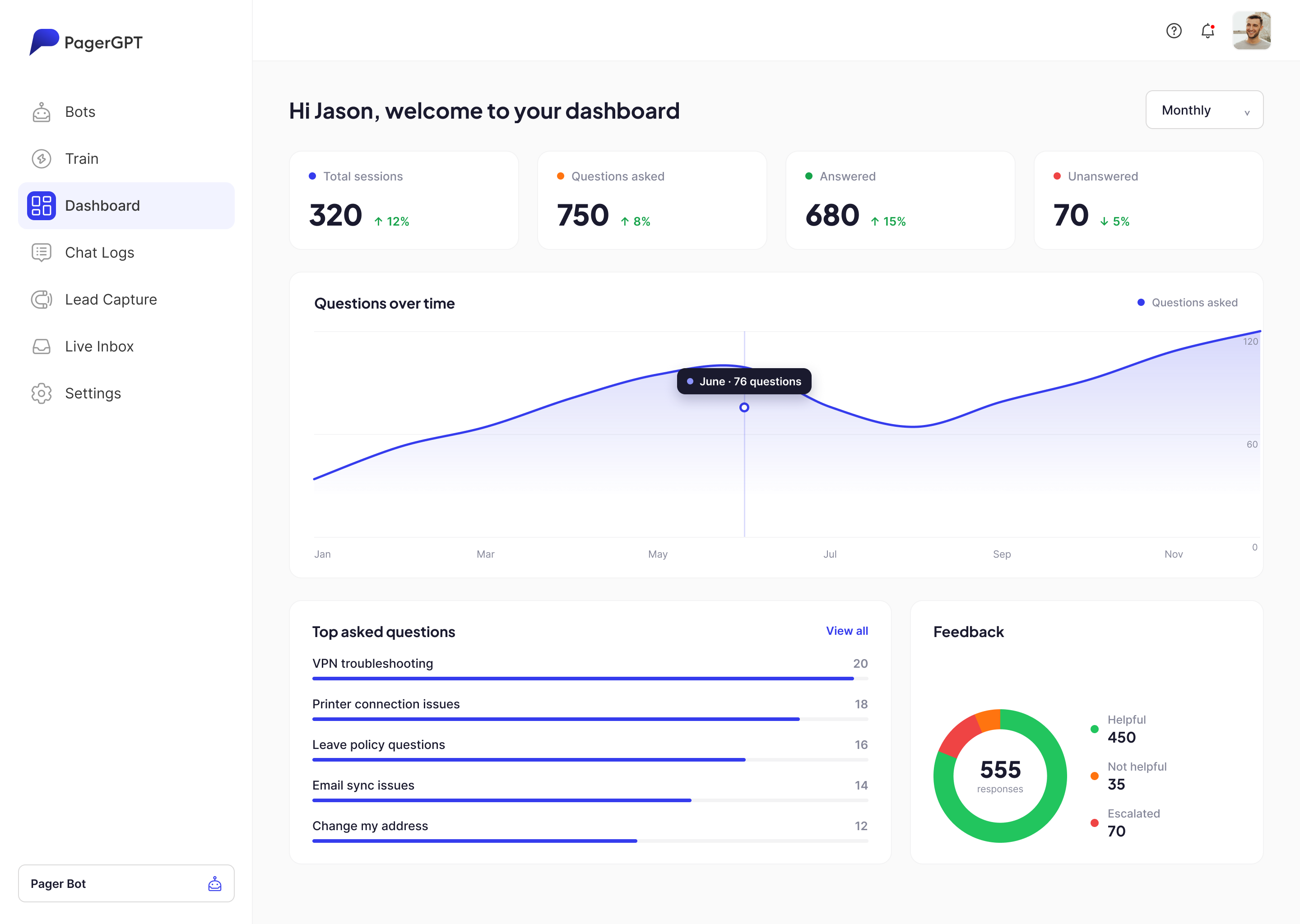
PagerGPT dashboard screenshot showing total sessions, questions asked, answered and unanswered counts, a questions-over-time chart, top asked questions and a feedback breakdown

Support teams are drowning in repetitive questions while the answers already exist — buried in help centres, PDFs and Slack threads. PagerGPT turns that scattered knowledge into a chatbot anyone can build in an afternoon, deploy anywhere, and trust to escalate to a human the moment it's out of its depth.

As Lead Product Designer I shaped the full experience — from the training pipeline and live agent inbox to the analytics dashboard and the component system tying it all together.

The core tension: make something powerful enough for support ops, yet simple enough that a non-technical admin never feels they're "configuring an AI." Every screen had to disappear behind the task.

Great answers exist. Getting them to people doesn't.

01

Knowledge is scattered

Answers live across help centres, PDFs, wikis and Slack threads. Agents re-type the same replies all day while users never find the docs.

02

Bots feel like a downgrade

Off-the-shelf chatbots are rigid and hard to train. They dead-end users instead of helping — so people learn to skip the bot and wait for a human.

03

No visibility into failure

Teams can't see which questions go unanswered, where the bot breaks down, or what knowledge to add next. The loop never closes.

Four principles the whole product answers to.

01

Training feels like uploading

Point the bot at a URL, sitemap or file — no prompts, no code. Knowledge in, answers out.

02

Design for graceful handoff

The bot knows its limits and passes to a human — with full context — the instant confidence drops.

03

Close the loop with insight

Every unanswered question surfaces in analytics, so the knowledge base improves itself over time.

04

One system, every surface

Web widget, Slack, Teams and the agent inbox all speak one visual and interaction language.

From scattered docs to resolved tickets — in five moves.

1

Train

Point it at URLs, sitemaps, files and apps.

2

Test

Chat with the draft bot and refine its answers.

3

Deploy

Ship to a web widget, Slack or Teams in one click.

4

Resolve

It answers instantly, 24/7, with real context.

5

Learn

Unanswered questions surface — you top up knowledge.

What support teams told us reshaped the whole flow.

Support-team interviews Competitor teardown Tree testing Usability testing (training flow)

"By the time I've explained the problem to the bot, I could've Googled it."

Setup dies when it feels technical.

So training became a 3-step wizard: add a source, auto-fetch, train — zero prompt engineering.

"If the bot can't help, don't make me start over with a human."

Broken handoffs destroy trust.

So escalation carries the full transcript and user details straight into the agent inbox.

"I honestly don't know what my bot is bad at."

Teams fly blind on quality.

So the dashboard leads with unanswered questions and feedback — not vanity session counts.

A crisp, geometric system tuned for dense product UI.

A geometric display face carries personality; a neutral UI sans keeps data-heavy screens quiet. Electric indigo does the pointing; everything else gets out of the way.

Aa

Plus Jakarta Sans

Display & headings — a geometric sans (standing in for the product's Euclid Circular B) that gives PagerGPT a modern, confident voice.

ABCDEFG · abcdefg · 0123456789

Aa

Inter

Body & UI — a neutral workhorse that stays legible in tables, logs and dense dashboards without ever competing for attention.

ABCDEFG · abcdefg · 0123456789

Palette

Primary#353CED
Ink#1A1A2E
Orange#FF7410
Link#0085FF
Tint#F2F3FF
Border#DBDADA

A product that stays out of its own way.

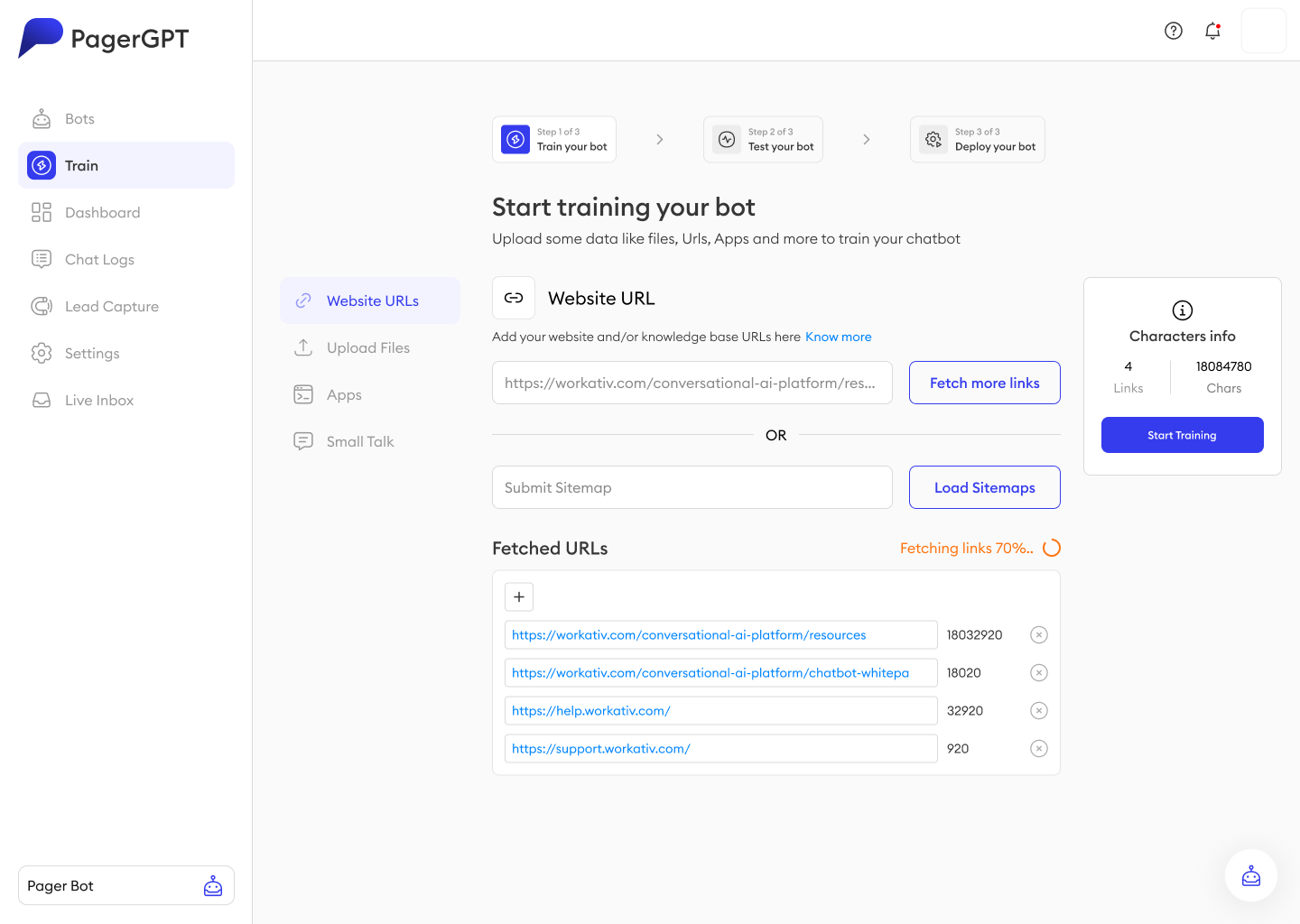
Train Your Bot

No-code training that feels like uploading

Add a website, sitemap, files or connected apps — PagerGPT fetches and indexes everything, shows a live character count, and trains in the background. The three-step rail keeps "what's next" obvious the whole way.

PagerGPT bot training screen showing website URL and sitemap fetch, fetched URLs list and a live character count panel
Chat Logs

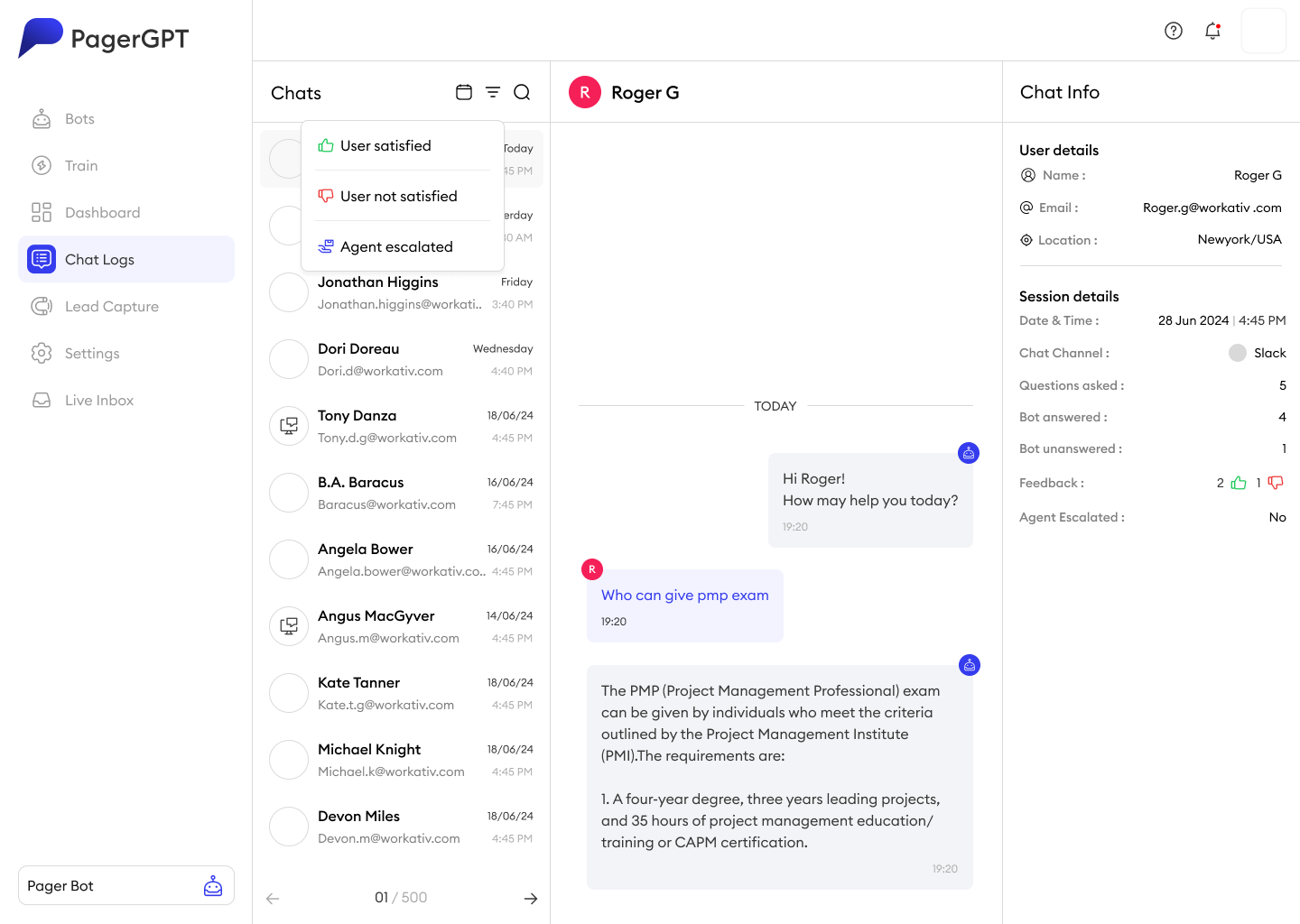
Every conversation, searchable and scored

A three-pane log pairs each transcript with rich context — channel, questions asked, bot answered vs. unanswered, feedback and escalation — so teams can audit quality at a glance and spot exactly where knowledge is missing.

PagerGPT chat logs screen showing a chat list, a conversation transcript and a chat info panel with user, session and feedback details

The dashboard that closes the loop.

Instead of vanity metrics, the home dashboard foregrounds what a support team can act on — what got asked, what went unanswered, and how people felt about the answer.

PagerGPT dashboard screenshot showing total sessions, questions asked, answered and unanswered counts, a questions-over-time chart, top asked questions and a feedback breakdown

Resolution at a glance

Sessions, asked, answered and unanswered — the four numbers that matter, up top.

Trends over time

A yearly question curve shows demand spikes so staffing and content can keep pace.

Top asked questions

The real backlog — the exact queries to turn into new knowledge next.

Feedback split

Helpful vs. not vs. escalated, so quality is a number, not a gut feeling.

Try it in a real chat — then ship in one click.

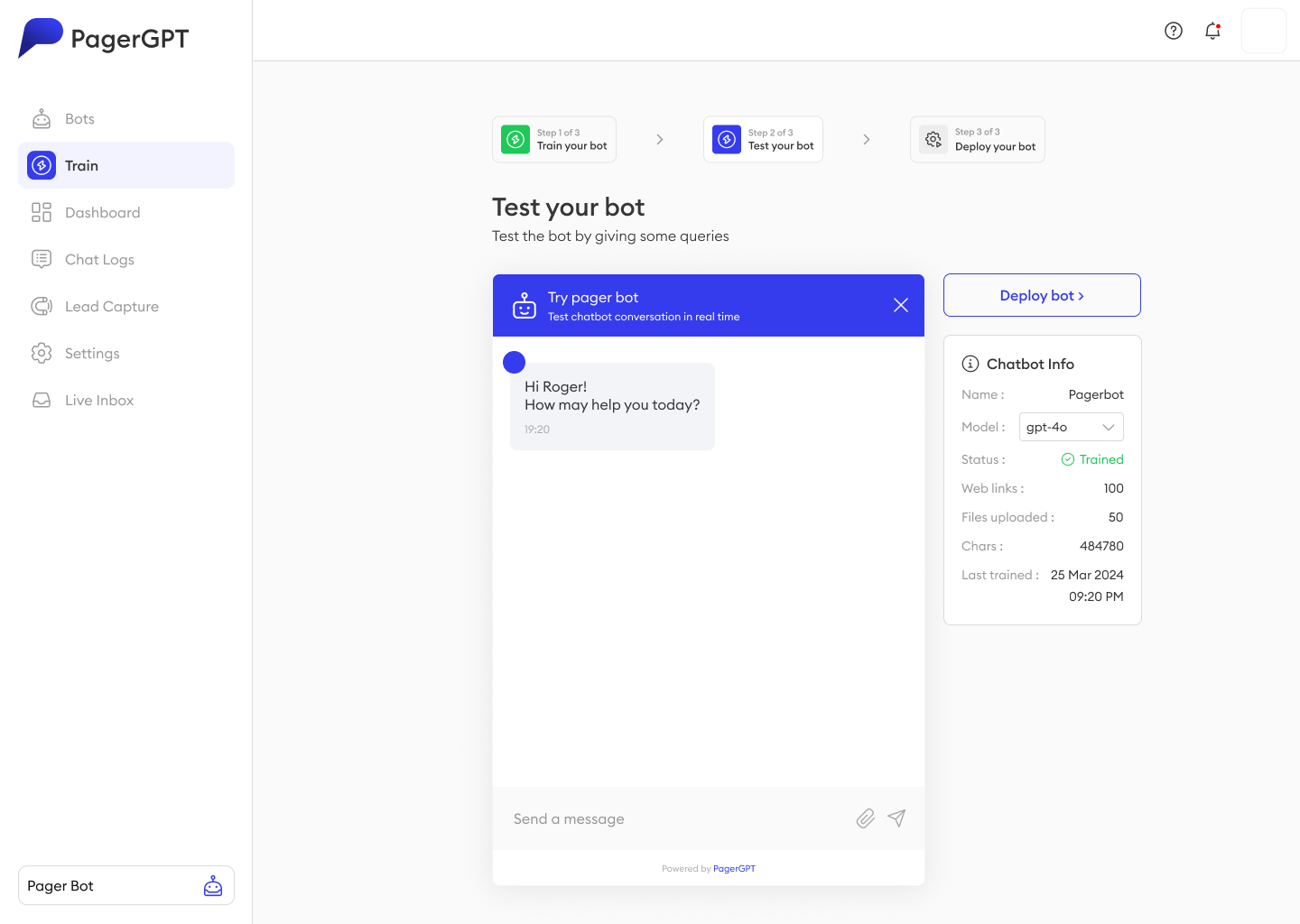
PagerGPT test-your-bot screen with a live chat preview, model selector and chatbot info panel showing trained status, web links and file counts

See it before users do

A live test chat runs the trained bot right inside the wizard — no staging, no guesswork.

Choose the model

Swap the underlying model (GPT-4o and others) from a dropdown — never a config file.

Deploy anywhere

One button pushes the same bot to a web widget, Slack or Microsoft Teams.

✓ Trained 100 web links 50 files 484,780 chars

One bot, wherever your users already are.

W

Web widget

An embeddable, fully themeable widget — the familiar bottom-right helper that matches your site out of the box.

S

Slack

Users ask in a DM or channel; the bot answers inline and escalates to your agents without leaving Slack.

M

Microsoft Teams

The same trained bot inside Teams — so internal IT and HR support lives exactly where employees already work.

What good looks like once it's live.

Illustrative metrics — swap in real figures once you have them.

82% Auto-resolution rate

Questions answered end-to-end without a human agent.

-55% Tickets to agents

Deflected by the bot across web, Slack and Teams.

<3s Median response

From a user's question to the first useful answer.

4.5/5 CSAT on bot replies

"Helpful" feedback averaged across live sessions.

The hardest part of an AI product isn't the AI — it's earning enough trust that people let it try.

Restraint was the real design tool. The temptation with an LLM product is to expose every knob; the win was hiding almost all of them behind three verbs — train, test, deploy — so a non-technical admin ships a capable bot without ever feeling they're "configuring an AI."

Designing the failure path mattered as much as the happy path. The human-handoff flow and the unanswered-questions loop are what make the confident moments believable — they're the reason people keep trusting the bot instead of routing around it.